YWGSD vs Akiflow
Akiflow is the best thing going for pulling tasks out of Slack, Gmail, Notion and Jira into one place. What it doesn’t do is plan them for you — their own help says the Schedule Optimizer doesn’t run automatically.
Every Akiflow fact here was read on their own site on 22 September 2026. Prices move — check theirs too.
Pick YWGSD if
- you want the planning done, not assisted
- your calendar is iCloud
- you want a trial longer than a week, and a refund if you forget
- you’d rather have no assistant in the loop
Pick Akiflow if
- your work arrives in Slack, Gmail, Notion, Jira or ClickUp
- you want native desktop apps and a command bar
- you’re on Android
- you want booking links, or an assistant you can message
At a glance
| Topic | YWGSD | Akiflow |
|---|---|---|
| Price | $24 a month, or $192 a year — $16 a month. Everything’s included on every plan. | Pro $19 a month billed yearly ($228 a year), or $34 month to month. Teams $12 per member billed yearly. No free plan. |
| Free trial | 14 days. A card up front, and we email you 3 days before the first charge. | 7 days. Whether a card is required isn’t stated on their site. |
| Refunds | Your first payment back within 7 days, taken yourself from Settings. No asking. | Their terms say purchases are non-refundable, with no refund for unused time, apart from the EU and UK cooling-off period. |
| How it schedules | Every task gets a real block in the gaps between your meetings, inside the hours you allow. The day rebuilds itself whenever something changes. | You time-block by hand, or ask their assistant. Their help page says the Schedule Optimizer doesn’t run automatically, doesn’t plan the whole inbox at once, and doesn’t work on mobile. |
| A task you didn’t get to | Moves to your next opening and stays in front of you until you finish it or cancel it. Past its deadline it turns amber. A missed repeat never expires. | Carried over to the next day as a list. “Replan Undone Tasks” suggests slots for you to confirm. |
| AI | None. The same calendar and the same lengths give the same plan every time. | Aki, an assistant you can reach by chat, voice, email, WhatsApp and Siri — in beta — plus briefings and MCP. It can be switched off. |
| Your calendars | Reads Google, Outlook and iCloud. Never writes to any of them. | Google and Outlook, two-way. No iCloud yet; their roadmap has it as Building Now. |
| Getting thoughts in | An Inbox that asks for nothing — no length, no priority, no deadline — then the once-over turns the pile into scheduled work in about a minute. | A command bar, Gmail and Outlook, Slack, widgets, Siri, the share sheet, the Action Button, WhatsApp, and 10-plus integrations. |
| Phones | The web app works in any phone browser. The iPhone app is built and waiting on the App Store. No Android app. | macOS, Windows, web, iOS and Android, with mobile described as limited. Accounts are created on the web. |
| Teams | No. One person, one plan, nothing shared. | Yes, on a Teams plan that starts with two seats. |
Price
YWGSD
$24 a month, or $192 a year — $16 a month. Everything’s included on every plan.
Akiflow
Pro $19 a month billed yearly ($228 a year), or $34 month to month. Teams $12 per member billed yearly. No free plan.
Free trial
YWGSD
14 days. A card up front, and we email you 3 days before the first charge.
Akiflow
7 days. Whether a card is required isn’t stated on their site.
Refunds
YWGSD
Your first payment back within 7 days, taken yourself from Settings. No asking.
Akiflow
Their terms say purchases are non-refundable, with no refund for unused time, apart from the EU and UK cooling-off period.
How it schedules
YWGSD
Every task gets a real block in the gaps between your meetings, inside the hours you allow. The day rebuilds itself whenever something changes.
Akiflow
You time-block by hand, or ask their assistant. Their help page says the Schedule Optimizer doesn’t run automatically, doesn’t plan the whole inbox at once, and doesn’t work on mobile.
A task you didn’t get to
YWGSD
Moves to your next opening and stays in front of you until you finish it or cancel it. Past its deadline it turns amber. A missed repeat never expires.
Akiflow
Carried over to the next day as a list. “Replan Undone Tasks” suggests slots for you to confirm.
AI
YWGSD
None. The same calendar and the same lengths give the same plan every time.
Akiflow
Aki, an assistant you can reach by chat, voice, email, WhatsApp and Siri — in beta — plus briefings and MCP. It can be switched off.
Your calendars
YWGSD
Reads Google, Outlook and iCloud. Never writes to any of them.
Akiflow
Google and Outlook, two-way. No iCloud yet; their roadmap has it as Building Now.
Getting thoughts in
YWGSD
An Inbox that asks for nothing — no length, no priority, no deadline — then the once-over turns the pile into scheduled work in about a minute.
Akiflow
A command bar, Gmail and Outlook, Slack, widgets, Siri, the share sheet, the Action Button, WhatsApp, and 10-plus integrations.
Phones
YWGSD
The web app works in any phone browser. The iPhone app is built and waiting on the App Store. No Android app.
Akiflow
macOS, Windows, web, iOS and Android, with mobile described as limited. Accounts are created on the web.
Teams
YWGSD
No. One person, one plan, nothing shared.
Akiflow
Yes, on a Teams plan that starts with two seats.
The three differences that matter
It plans itself, every time something changes
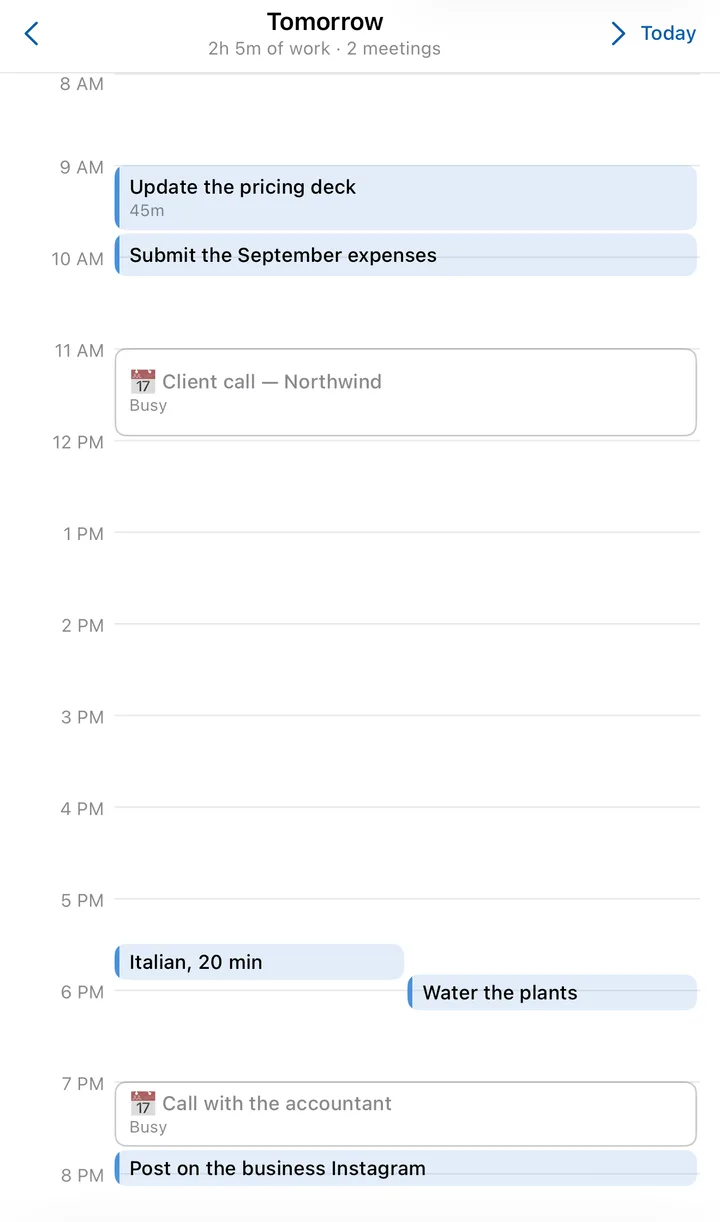
Akiflow’s optimiser is something you run, and their help says it doesn’t run automatically or work on mobile. YWGSD has no button to press: every change to your calendar, your tasks or your hours rebuilds the day, on the phone as well as the web.
iCloud, today
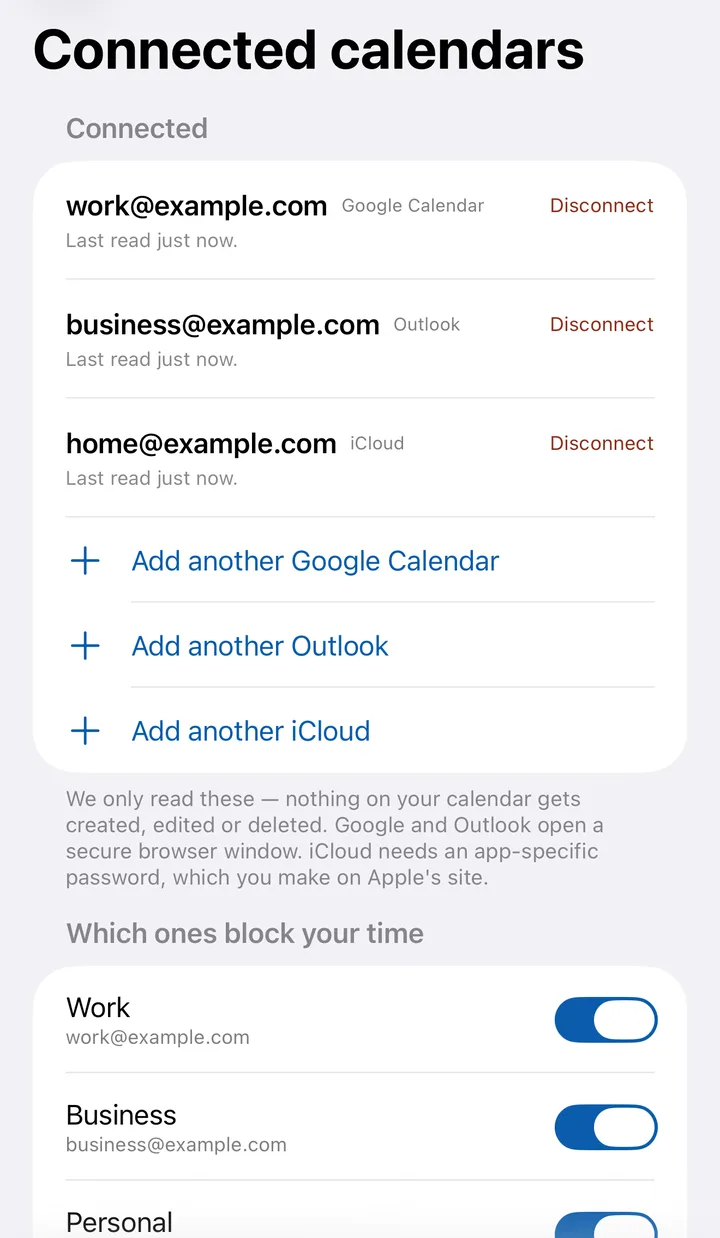
Akiflow connects Google and Outlook, and lists iCloud as still being built. If your life is in Apple’s calendar, YWGSD reads it now, with an app-specific password you make on Apple’s own site — and it never writes anything back.
Longer to try, and a way out
Akiflow gives you 7 days and says purchases are non-refundable. YWGSD gives you 14, emails you 3 days before the charge, and leaves a refund button in Settings for 7 days after it.
Where Akiflow is better
Written plainly, because you’re going to find out anyway.
- pulling tasks in from Slack, Gmail, Notion, Jira, ClickUp and more
- native desktop apps, offline, and a fast command bar
- Android
- booking links for meetings
- an assistant you can reach from WhatsApp or Siri
Switching takes about ten minutes
- 1
Connect your calendars
Google, Outlook and iCloud. We read them so work lands around your meetings, and we never write to them.
- 2
Say when you work
One set of hours to start with. Add more later if the evenings belong to something else.
- 3
Type your list into the Inbox
One line, Enter, next — the field keeps focus, so a whole list goes in as fast as you can type it. No lengths or deadlines yet.
- 4
Give it the once-over
How long, how important, and it’s scheduled. Keep Akiflow running alongside for a week if you like; nothing here writes to your calendar, so the two can’t fight.
The four rules behind itCompared with the others
Let your week plan itself.
14 days free. We email you before we charge, and you can cancel in one click.
Sources, all read on 22 September 2026
- Akiflow pricing
- Akiflow terms (refunds)
- Akiflow help: Schedule Optimizer
- Akiflow: iCloud on the roadmap
- Akiflow help: mobile app
Something here out of date? Tell us and we’ll fix it: support.