YWGSD vs Sunsama
Sunsama asks you to sit down each morning and plan the day yourself, and it’s very good at making that pleasant. YWGSD does the planning, and does it again whenever the day changes.
Every Sunsama fact here was read on their own site on 22 September 2026. Prices move — check theirs too.
Pick YWGSD if
- you don’t want a daily ritual to keep up
- you want work placed for you, not dragged into place
- nothing you didn’t finish should be archived away
- you want a refund you can take yourself
Pick Sunsama if
- the morning ritual is the part you actually want
- you’re on Android, Windows or Linux
- you live in Slack, Notion, Jira or Asana and want them pulled in
- you want a trial with no card
At a glance
| Topic | YWGSD | Sunsama |
|---|---|---|
| Price | $24 a month, or $192 a year — $16 a month. Everything’s included on every plan. | One plan: $17 per user a month billed yearly ($204 a year), or $22 month to month. No free plan. |
| Free trial | 14 days. A card up front, and we email you 3 days before the first charge. | 14 days, no card. Access stops when it ends. |
| Refunds | Your first payment back within 7 days, taken yourself from Settings. No asking. | Their terms say all purchases are final and no refunds are provided. |
| How it schedules | Every task gets a real block in the gaps between your meetings, inside the hours you allow. The day rebuilds itself whenever something changes. | You plan each day by hand in a guided ritual — a shutdown at night and a weekly review too. Time-boxing is manual, or one task at a time with a shortcut, and auto-rescheduling only resolves overlaps. |
| A task you didn’t get to | Moves to your next opening and stays in front of you until you finish it or cancel it. Past its deadline it turns amber. A missed repeat never expires. | Rolls over to the next day’s list at midnight. Tasks that roll over several days in a row get archived. |
| AI | None. The same calendar and the same lengths give the same plan every time. | A Sunny assistant that stays off until you enable it, AI estimates and summaries you can opt out of, and MCP. |
| Your calendars | Reads Google, Outlook and iCloud. Never writes to any of them. | Google, Outlook and iCloud. Time-boxing creates events on your Google or Outlook calendar, unless you send them to a private Sunsama calendar instead. |
| Getting thoughts in | An Inbox that asks for nothing — no length, no priority, no deadline — then the once-over turns the pile into scheduled work in about a minute. | Email forwarding, a desktop global shortcut, Siri, and more than 20 integrations. |
| Phones | The web app works in any phone browser. The iPhone app is built and waiting on the App Store. No Android app. | iOS, iPadOS and Android, described as companions, plus macOS, Windows and Linux apps. |
| Teams | No. One person, one plan, nothing shared. | Shared billing rather than shared work — their own help says there’s no collaboration inside a workspace. |
Price
YWGSD
$24 a month, or $192 a year — $16 a month. Everything’s included on every plan.
Sunsama
One plan: $17 per user a month billed yearly ($204 a year), or $22 month to month. No free plan.
Free trial
YWGSD
14 days. A card up front, and we email you 3 days before the first charge.
Sunsama
14 days, no card. Access stops when it ends.
Refunds
YWGSD
Your first payment back within 7 days, taken yourself from Settings. No asking.
Sunsama
Their terms say all purchases are final and no refunds are provided.
How it schedules
YWGSD
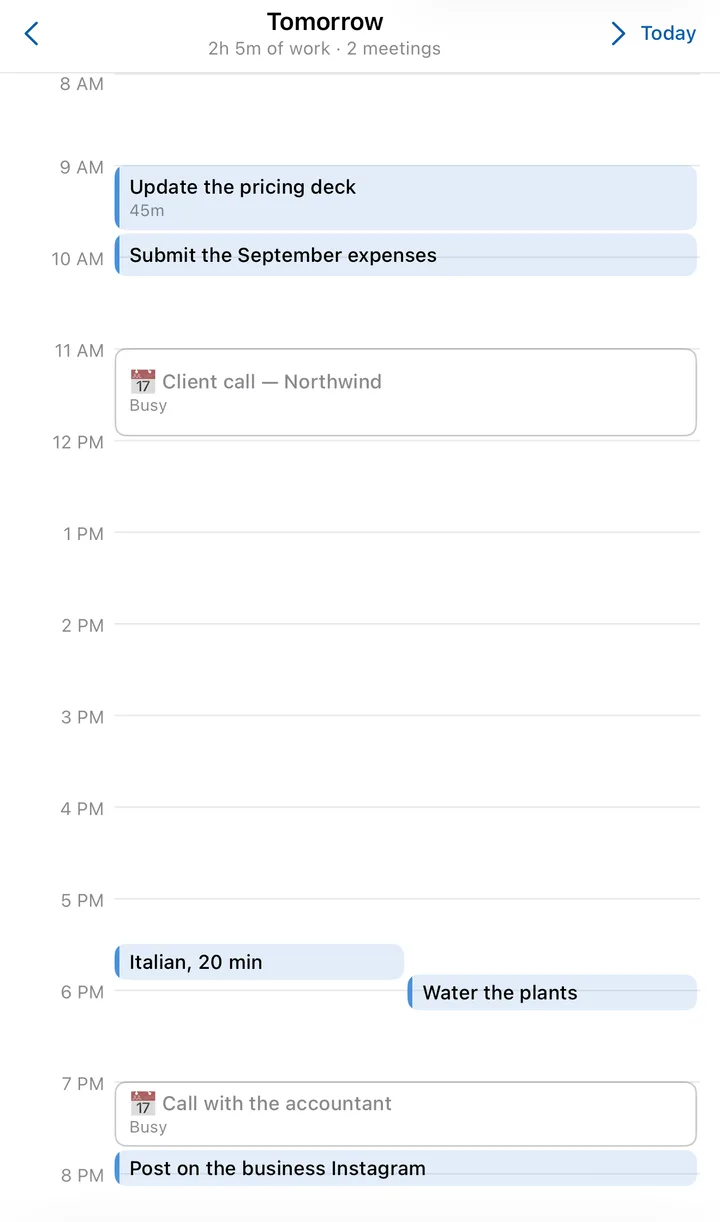
Every task gets a real block in the gaps between your meetings, inside the hours you allow. The day rebuilds itself whenever something changes.
Sunsama
You plan each day by hand in a guided ritual — a shutdown at night and a weekly review too. Time-boxing is manual, or one task at a time with a shortcut, and auto-rescheduling only resolves overlaps.
A task you didn’t get to
YWGSD
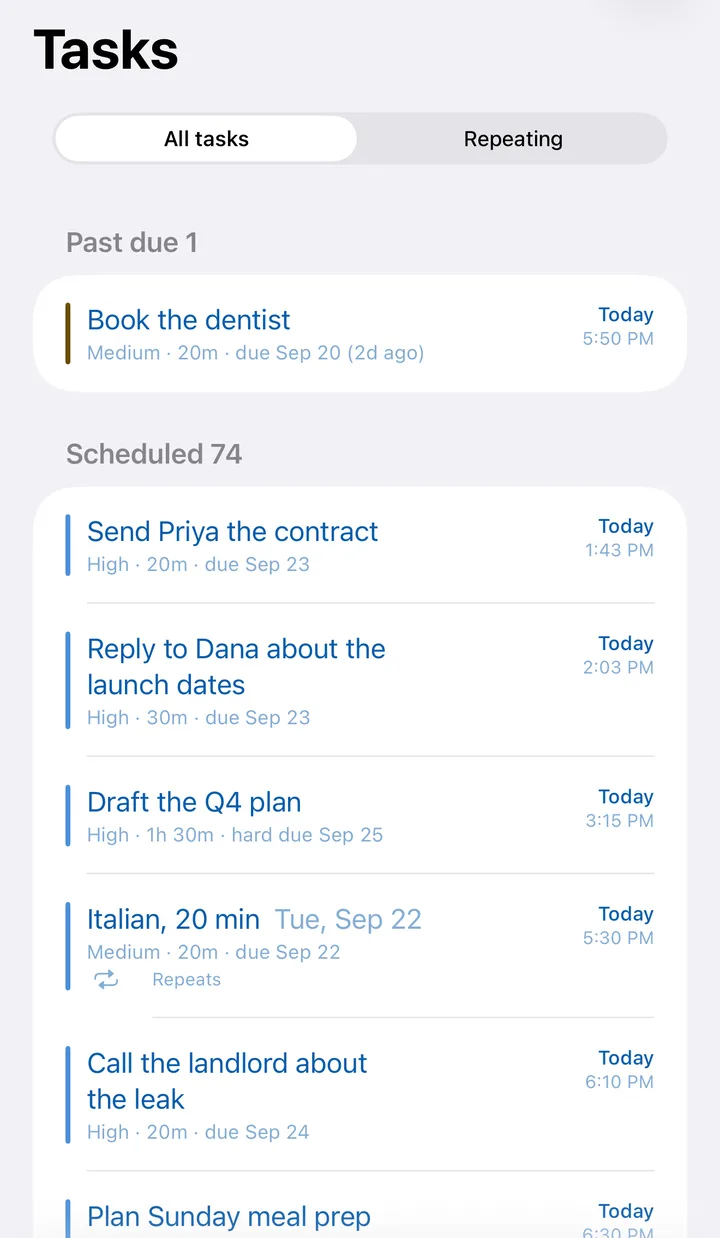
Moves to your next opening and stays in front of you until you finish it or cancel it. Past its deadline it turns amber. A missed repeat never expires.
Sunsama
Rolls over to the next day’s list at midnight. Tasks that roll over several days in a row get archived.
AI
YWGSD
None. The same calendar and the same lengths give the same plan every time.
Sunsama
A Sunny assistant that stays off until you enable it, AI estimates and summaries you can opt out of, and MCP.
Your calendars
YWGSD
Reads Google, Outlook and iCloud. Never writes to any of them.
Sunsama
Google, Outlook and iCloud. Time-boxing creates events on your Google or Outlook calendar, unless you send them to a private Sunsama calendar instead.
Getting thoughts in
YWGSD
An Inbox that asks for nothing — no length, no priority, no deadline — then the once-over turns the pile into scheduled work in about a minute.
Sunsama
Email forwarding, a desktop global shortcut, Siri, and more than 20 integrations.
Phones
YWGSD
The web app works in any phone browser. The iPhone app is built and waiting on the App Store. No Android app.
Sunsama
iOS, iPadOS and Android, described as companions, plus macOS, Windows and Linux apps.
Teams
YWGSD
No. One person, one plan, nothing shared.
Sunsama
Shared billing rather than shared work — their own help says there’s no collaboration inside a workspace.
The three differences that matter
The plan happens without you
Sunsama’s day is one you build each morning; their own comparison page says it only auto-adjusts tasks when you take explicit action. YWGSD places every task itself and rebuilds the day whenever a meeting lands, something overruns or you finish early.
Nothing gets archived for being old
In Sunsama, a task that rolls over several days in a row is archived. In YWGSD there’s no such thing: it keeps moving to your next opening, and turns amber once its deadline has passed, until you finish it or cancel it on purpose.
A refund you take yourself
Sunsama’s terms say all purchases are final. YWGSD emails you 3 days before the first charge, and for 7 days after it there’s a button in Settings that refunds it without a conversation.
Where Sunsama is better
Written plainly, because you’re going to find out anyway.
- native apps on every platform, including Android, Windows and Linux
- more than 20 integrations for pulling tasks in
- a 14-day trial with no card
- the daily ritual itself, if that’s what you’re after
- SOC 2 and SSO
Switching takes about ten minutes
- 1
Connect your calendars
Google, Outlook and iCloud. We read them so work lands around your meetings, and we never write to them.
- 2
Say when you work
One set of hours to start with. Add more later if the evenings belong to something else.
- 3
Type your list into the Inbox
One line, Enter, next — the field keeps focus, so a whole list goes in as fast as you can type it. No lengths or deadlines yet.
- 4
Give it the once-over
How long, how important, and it’s scheduled. Keep Sunsama running alongside for a week if you like; nothing here writes to your calendar, so the two can’t fight.
The four rules behind itCompared with the others
Let your week plan itself.
14 days free. We email you before we charge, and you can cancel in one click.
Sources, all read on 22 September 2026
- Sunsama pricing
- Sunsama terms (refunds)
- Sunsama: how it compares
- Sunsama help: task rollover
- Sunsama help: timeboxing and auto-scheduling
Something here out of date? Tell us and we’ll fix it: support.